
Scorbit 2.0.9 Is Here – QR Codes Return, and a New Way to Think About Your Collection

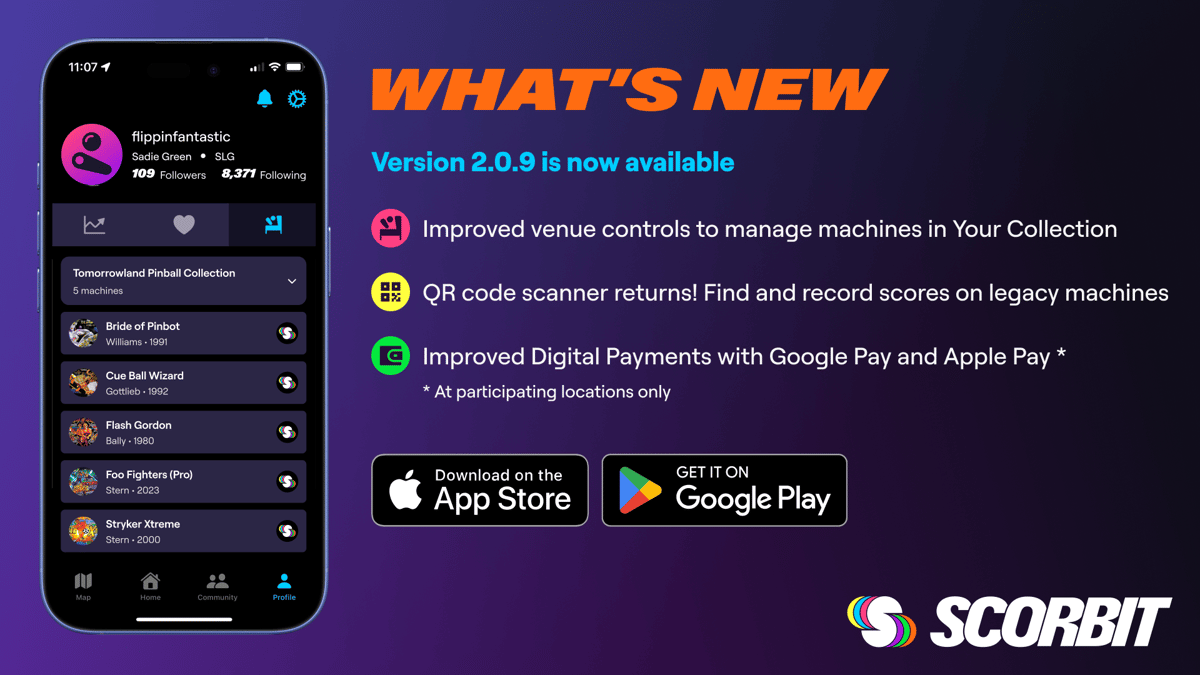
Hey pinball people! We’re excited to share what’s new in Scorbit 2.0.9. This release has some features we know you’ve been waiting for, along with an important set of changes to how venues and collections work in the app. We want to take a little time to walk through all of it, because the venue changes in particular affect how you find and share your machines and we want to make sure everyone’s on the same page.
QR Code Scanning Is Back!
This is a big one many of you have been asking about. QR code scanning, one of the most-used features from Scorbit v1, is officially back in version 2.0.9.
If you’re not familiar: Some machines display a QR code during gameplay (or the owner printed one and placed on the machine). When a player scans that code, the app takes them straight to that machine’s session screen. No searching, no typing, no hunting around. It’s one of the fastest ways to check in to a game, and we’re happy to bring it back by popular demand.
This feature works from your phone’s camera or favorite QR scanning app. We expect to have a scanning feature added within the Scorbit app soon.
Digital Payments Made Easier with Apple Pay and Google Pay
We’ve refreshed and improved our Apple Pay and Google Pay integrations for adding funds to your Scorbit account. The experience should feel much smoother than before and can be used at participating locations such as Rullo’s in Brooklyn, NY and Viking Pizza in Spring Hill, TN. We’re adding more and more participating locations every day so be sure to check the list to see where you can use Scorbit to pay for games!
And if you happen to notice something new on your profile related to “Winnings”… let’s just say we’re getting ready for some exciting things. More soon!
A New Way to Think About Venues and Collections
Okay, this is the section we really want you to read, especially if you own pinball machines at home or are a Virtual Pinball user.
Over the past several months, as we’ve been migrating the Scorbit platform and data from v1 to v2, some of you noticed that your shared venues had gone private, or were showing up strangely, or couldn’t be edited the way you expected. We know that was frustrating, and we appreciate your patience while we worked through a genuinely complicated infrastructure transition. Pinball and Scorbit are complicated!
With 2.0.9, we’ve landed on a cleaner, more intentional model for how venues work. Going forward, Scorbit has three distinct venue types:
Private Collections are associated with your user account, not a physical location. When you add a machine to Scorbit without linking it to a public venue or location, it goes here by default. This matters for privacy: a lot of Scorbit users have machines at home, and we don’t think your home address should be showing up on a public map just because you own a pinball machine.
Private Collections have no location attached, so they’ll never appear on the map, keeping your personal location secure. If you and another user mutually follow each other, you can each see the other’s collection on their profile, so you still get to show off your machines to the people you want to play pinball with. If you had a home venue set up in v1, it’s been converted to a Private Collection. The mutual-follow system is now the way to share it with friends and family.
Shared Venues are essentially invite-only locations. They have a real-world address and will appear on the map, but only for users who are members of that venue. Think pinball clubs or collectives, private basements, or any location that has a physical address but shouldn’t be discoverable by the general public. Some Shared Venues were carried over from v1 and are now fully compatible with v2. Full tools for creating and managing Shared Venues from within the app are coming in a future release, but now your existing ones will function as before.
Public Venues are the fully discoverable locations you know and would expect to find: arcades, bars, anywhere that wants players to find them to come frequent and play pinball at. Public Venues are verified, they appear on the map for everyone, and they’re located via our shared data connection with our friends at Pinball Map as well. If you had a public venue in v1, it was largely unaffected by the migration.
Where Are My Machines?
If you own a pinball machine, here’s a quick breakdown of the three places your machines can live in the app:
- My Machines is always your master list, no matter where a machine is physically located. Find it under Profile > Settings (gear icon on iOS or three dots on Android) > My Machines.
- Your Collection shows up on the Machines/Collections tab of your profile (on the right). These are machines you own that aren’t associated with a Public Venue. (In 2.0.9 this tab still reads “Private Venue,” we’re updating that label in the next app update to better reflect what it actually contains.)
- Map > Search > Venue is where you’ll find machines at public locations, including yours if they’re linked to a Public Venue.
One note worth calling out: if you want another user to see your collection machines on your profile, you’ll need to mutually follow each other. You can do this by tapping the Follow button on their profile. You can find other users via the search bar in the Community tab on the bottom nav. Once you’re following each other, your collections will be visible on your respective profiles.
Delete Machines from Machine Settings
A straightforward but much-requested improvement: you can now delete a machine directly from Machine Settings. Add the machines you love, remove the ones you don’t. It’s all right there. Pretty simple, right?
A Closing Note from Scorbit HQ
We want to be straightforward about the past few months. The v1 to v2 migration was a big undertaking, and some of that complexity showed up in your experience in ways it shouldn’t have. We’re grateful for everyone who stuck with us through it. 2.0.9 represents the clearest picture yet of where we’re headed: more control over your collection, smarter venue management, and the groundwork for real competitive play with real stakes, which is right around the corner.
As always, if you have questions about how your machines or venues have been migrated, we’re here to help. Reach out at [email protected] or find us on the Scorbit Discord.
Keep flipping and having fun!
– The Scorbit Team
Don't have the Scorbit app yet? Download it today from the Apple App Store or the Google Play Store.